
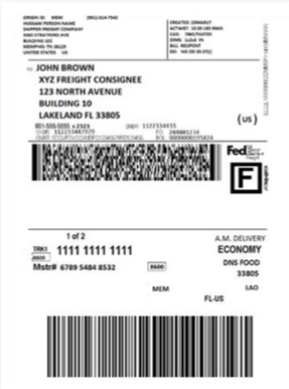
Anyone can make and print a fedex shipping label at home or work. The steps are easy to follow. You only need internet, a printer, and shipping info. Fedex helps make shipping simple for all people. With fedex, you do not wait in long lines. You save both time and money by doing it yourself. Fedex shipping label creation works for one box or many boxes. You can track your package or print a fedex shipping label in a few steps. Fedex gives you more control and choices. Sending a package does not have to be hard. With a fedex shipping label, shipping is quick and simple. Fedex helps you ship with trust every time.
Key Takeaways
You can make and print FedEx shipping labels online. You need a computer or smartphone with internet and a printer.
Get package details like who gets it, weight, and size ready. This helps you make the label fast and correct.
A FedEx account saves time by keeping addresses and tracking shipments. It also gives discounts. You can still make labels as a guest without signing up.
Printing labels at home saves time and money. You do not need to go to FedEx stores. You can ship things anytime.
Pick the right label type and attach it well. This helps your package get delivered and tracked correctly.
FedEx Shipping Label Creation

Requirements
You need a few things before you start fedex shipping label creation. You must have a computer or smartphone with internet. You also need a printer to print the fedex shipping label. Get your package details ready. This means you should know the recipient’s name, address, and phone number. You also need to know how much the package weighs and its size. Picking the right fedex shipping service is important. Some services are faster, but some cost less. Having all this information makes fedex shipping label creation easy and quick.
Tip: Write down the package weight and size first. This helps you avoid mistakes and saves time.
Online Process
Making a fedex shipping label online is easy and quick. Anyone can do it in just a few steps. Here is a shipping labels guide to help you:
Go to the fedex website and find “Create a Shipment.”
Fill in the sender and recipient details. Check the address to make sure it is correct.
Enter the package weight and size.
Pick the fedex shipping service that fits your needs and budget.
Look at the shipping cost and delivery time.
Pay for the shipment with a credit card or other way.
Download and print the fedex shipping label.
You can print the fedex shipping label right away. You do not have to wait in line at a fedex location. This process works for one package or many packages. You can manage shipping labels for more than one shipment if you have several packages.
Here are some reasons people like online fedex shipping label creation:
Printing fedex shipping labels online saves both time and money.
The process is fast and simple for everyone.
You can print labels at home and skip trips to fedex offices.
You can make labels online whenever you need them.
If you ship sometimes, you can make labels as a guest without an account.
If you ship often, an account lets you ship faster, save addresses, and get discounts.
Saving addresses in your account makes label creation faster.
Online label creation means you do not need paper Bills of Lading for domestic LTL freight, so there are fewer mistakes and delivery problems.
You can track shipments closely, even down to the pallet, which helps you manage shipments better.
The process is contact-free, so pickup times are shorter and docks are less crowded.
Sending data online means fewer invoice mistakes and less confusion than using paper.
Note: Some ecommerce tools, like Shiptheory, can automate fedex shipping label creation. These tools connect to online stores and help make shipping labels without typing details every time.
Guest vs Account
Fedex shipping label creation works for both guests and account holders. If you ship only once in a while, you can use the guest option. You do not need to sign up or remember a password. This makes it easy for anyone to make shipping labels fast.
If you ship often, you may want to open a fedex account. An account lets you save addresses, track shipments, and get special discounts. Account holders can also see their shipping history and manage shipping labels for many packages. Making an account helps regular shippers create fedex shipping labels faster.
The main differences between guest and account shipping:
Feature | Guest Shipping | FedEx Account Shipping |
|---|---|---|
Sign-up Needed | No | Yes |
Save Addresses | No | Yes |
Access to Discounts | No | Yes |
Track Shipping History | No | Yes |
Manage Shipping Labels | No | Yes |
Tip: If you ship packages often, opening a fedex account can save you time and money.
Fedex shipping label creation gives everyone the tools to ship easily. Whether you ship once or every day, the online process is simple. This shipping labels guide helps anyone start and ship smarter.
Benefits of FedEx Shipping Label
Convenience
Fedex makes shipping simple for everyone. You can make a fedex shipping label at home or work. There is no need to wait in line at fedex. With a few clicks, you can print a label and get your package ready. Batch printing lets you print many labels at once. This saves even more time. Fedex gives real-time tracking and sends email updates. These features help you know where your package is. Many people link fedex to their online stores. This means they do not have to type shipping details each time. The whole process is faster and less stressful.
Tip: When you print a fedex shipping label at home, you can ship any time. You can even ship late at night or early in the morning.
Cost Savings
Fedex helps people and businesses save money on shipping. You can pick the best rates and use automation. A business can save about $0.60 for each fedex shipping label. If a company ships 500 packages a day, it saves $300 daily. That is over $9,000 every month. Batch printing also lowers labor costs. Workers spend less time on each package. Automation tools like VESYL and AfterShip help avoid mistakes and overpaying. These tools give special fedex rates, even for small shippers. Saving money on each label means more profit for businesses. It also means lower costs for everyone.
Control
Fedex gives users more control over their shipping. You can track every package in real time. You get alerts if something changes. You can fix problems fast because you see updates right away. Fedex Ship Manager works with ecommerce platforms like Shopify and WooCommerce. This lets you manage orders, print labels, and check shipping status in one place. Address checks and data tools help stop mistakes and returns. Bulk import and batch processing make it easy to handle many packages. Custom templates and reports show how well your shipping works. You can spot problems and make changes quickly.
Batch shipping and printing help lower mistakes and save time.
Real-time tracking and email alerts keep you updated.
Automation and data checks help stop mistakes and returns.
Advanced reports show on-time delivery and cost per shipment.
Integration with other systems keeps all shipping data together.
A fedex shipping label helps people ship smarter. You save time, spend less, and track every package better.
Create Shipping Labels and Print Options
Regular Paper
Many people want to know how to print fedex labels at home or in the office. Regular printer paper works well for most shipping needs. After you create shipping labels online, you can print shipping labels using any standard inkjet or laser printer. Just make sure the paper is clean and the ink is clear. Place the printed fedex shipping label on the largest flat side of the box. This helps the barcode scan easily during shipping. If you use regular paper, you will need to attach the label with clear packing tape.
Tip: Cover the entire label with tape, but do not tape over the barcode too many times. Too much tape can make it hard for scanners to read the code.
Label Products
Some people prefer special label products for shipping. These labels stick right onto the box, so you do not need extra tape. Fedex supports half-sheet sticker labels and full-sheet adhesive labels. Many office supply stores sell these products. Thermal printers also work well for fedex shipping label printing. Thermal labels resist smudging and water, so they stay readable during shipping. Businesses that ship many packages often use thermal printers for speed and quality. Using high-quality label paper and adhesive helps keep the label in place from pickup to delivery.
Attaching Labels
Attaching the fedex shipping label the right way keeps your package moving. Here are some best practices:
Use strong adhesive or clear packaging tape to secure the label. This stops peeling during shipping.
Make sure the label is easy to see. Do not cover it with other stickers or markings.
Place the label on a flat, smooth surface.
If you use sticker labels, press down all edges to avoid curling.
Print shipping labels with a thermal printer for the most durable results.
Note: A secure label means fewer delays and better tracking. Packages with loose or hidden labels may get lost or returned.
These options help anyone create shipping labels and print them at home or work. Fedex gives flexible ways to handle shipping, so every package arrives safely.
FedEx Prepaid Return Labels
Label Types
Fedex has different return labels to help with shipping. People use fedex return labels for both local and international shipping. Some types are the Courtesy Return Label, which goes in the box even if a return is not planned. There are also labels for trade show returns, items sent for loan, and repair or processing returns. Fedex supports trial returns, where someone tries a product and sends it back. Replacement shipments use fedex return labels when a new item ships before the old one comes back. Fedex Express and Fedex Ground return labels work with any shipping service, so people have choices. These labels do not expire, so you can use them whenever you need.
When to Use
Fedex return labels are helpful in many situations. People use them for:
Courtesy returns, when a return might happen but is not expected
Trade show or exhibition returns
Items sent for loan or short-term use
Repair or processing returns
Trial returns for products sent out for testing
Replacement shipments, when a new item ships before the old one comes back
Temporary export or other special return reasons
Fedex return labels can go inside the first package or be sent by themselves. They work for both fedex express and ground shipping. These labels stay good for a long time, so you do not have to hurry to use them. Fedex does not allow dangerous goods or hazardous materials with return labels. Each shipping service has its own highest declared value.
Tip: Add an RMA number to the fedex return label for better tracking and faster handling.
How to Create
Anyone can make return shipment labels with fedex in a few easy steps. Here’s how:
Go to the fedex website and sign in or use the guest option.
Pick “Create a Shipment” and choose the return label option.
Type in the recipient’s address and the return address. You can pick a different return address if you want.
Fill in the shipping details, like package weight and size.
Add any special services, like Saturday delivery or hold at location.
Include an RMA number if you want better tracking.
Check the shipping cost and pay.
Print the fedex return label and put it in the package or send it to the person.
Fedex makes it easy to make return shipment labels for any shipping need. People can track returns for up to 255 days. Fedex return labels help everyone handle returns with less stress and more control.
Shipping Tips and Label Supplies
Compatible Products
Fedex works with many types of label products. You can use half-sheet adhesive labels or full-sheet sticker labels. Thermal labels are also a good choice. These labels fit most home and office printers. Thermal labels are great for busy shipping rooms. They do not smudge or fade. Fedex suggests using weather-resistant and strong labels. These labels keep shipping details clear if the box gets wet or dirty. Large, bold fonts help fedex workers scan and read the label fast. Put the label on a flat, easy-to-see spot on the box. This helps avoid delays. Barcode or QR code labels make tracking simple and quick.
Where to Buy
You can find fedex-compatible shipping labels at many stores. Office supply shops like Staples and Office Depot sell these labels. Online stores such as Amazon and Walmart have many label choices. Fedex locations sometimes have label supplies for last-minute needs. For thermal labels, brands like Dymo and Zebra make rolls for most printers. Buying in bulk saves money if you ship often. Always check that the labels work with your printer and fedex shipping rules.
Tip: Pick labels with strong adhesive. This keeps them in place during fedex shipping.
Efficiency Tips
Shipping is faster and safer with good habits. Here are some tips for better fedex shipping:
Use large, clear fonts on every fedex shipping label. This helps avoid mistakes and makes sorting faster.
Pick weather-resistant labels for fedex shipping. These labels stay readable in rain or snow.
Put the fedex shipping label on a flat, open part of the box. Do not use corners or seams.
Use barcode or QR code labels for fedex shipping. These codes help machines track packages fast.
Make sure the label has high contrast. Black text on a white label works best for fedex shipping.
Automate fedex shipping with order management tools. These tools pick the best carrier and route.
Try route optimization software for fedex shipping. This software finds the fastest way to deliver packages.
Ask fedex for volume discounts if you ship a lot. Lower costs help businesses grow.
Use SaaS shipping platforms to compare fedex rates and print labels in batches.
Good fedex shipping labels lower mistakes and speed up delivery. The right habits and supplies make every fedex shipping job easier.
Making a FedEx shipping label at home or work helps you save time and money. You can print labels for any shipping job, like sending packages or making returns. This works for one box or many boxes at once. FedEx sells label rolls in different sizes. Some labels cost as little as $0.06 each.
Feature | Details |
|---|---|
Price per label | As low as $0.06 |
Label quantities | Rolls from 100 to 5,000 |
Shipping options | Economy, Expedited, Overnight |
If you use the right label and follow easy tips, shipping and returns go well. Anyone can start shipping smarter with FedEx right now.