
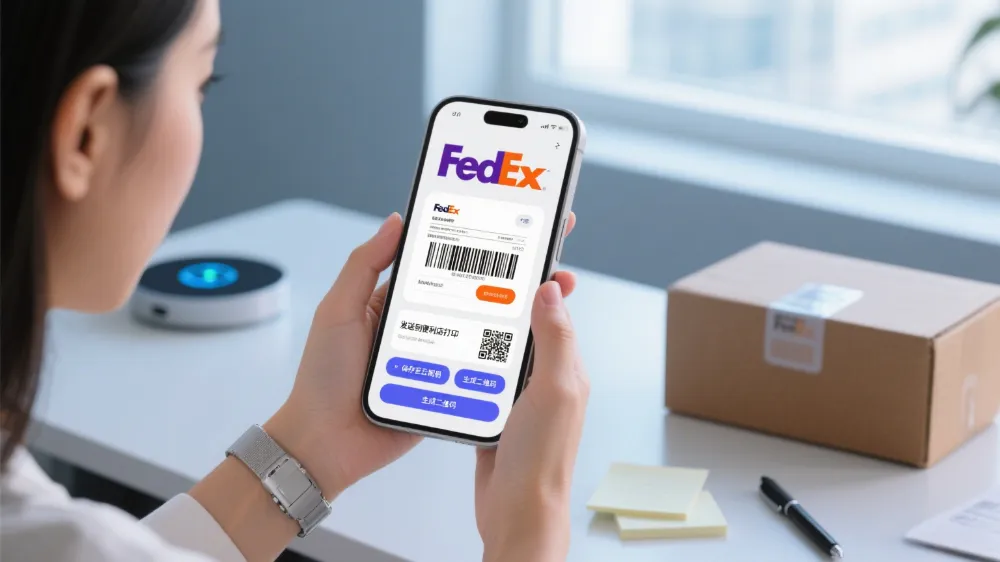
People can print a Fedex Print Label without a printer by using some easy methods.
The FedEx Mobile app QR code lets you show a code at any FedEx location, where staff can print the Fedex Print Label for you.
FedEx Office self-service kiosks allow you to log in and print Fedex Print Labels directly from your email or cloud storage.
If you send the label to printandgo@fedex.com, you’ll receive a code that you can use to print your Fedex Print Label at FedEx Office.
Public print locations, such as libraries and copy shops, also make it simple to print Fedex Print Labels.
You can even send the Fedex Print Label to a friend, which is helpful if you need someone else to print it for you.
FedEx offers convenient options to ship, making it easy for everyone to print a Fedex Print Label and send their packages.
Key Takeaways
You do not need a printer to print a FedEx label. You can use FedEx stores, self-service kiosks, or show a QR code on your phone. The FedEx Mobile app makes QR codes for you. Staff can scan these codes to print your label fast at many FedEx places. Self-service printers at FedEx stores help you print labels from email, USB, or cloud storage. The steps are easy to follow. You can also print labels at public places like libraries or copy shops. Friends can help you print if you do not have a printer. Using digital labels and QR codes saves time and money. It also helps FedEx use less paper and protect the environment.
FedEx Print Label Options
In-Store Printing
FedEx has different ways to print a fedex print label at their stores. Many people like in-store printing because it is quick and works well. To print a fedex print label at a FedEx Office or Ship Center, you need to do a few things. First, type your ZIP code into the FedEx search box to find a store close to you. Next, pick your city from the list. Then, look for the “Copy and Print” sign to see which places can print for you. Pick the store that is easiest for you to visit. If you got your shipping label by email, you can ask a worker to print it. You might have to pay a small fee. If you have a QR code for your fedex print label, show it to the worker. They will scan it and print your label.
FedEx workers can print a fedex prepaid shipping label from your phone or email. This is helpful if you do not have a printer at home. You can also make shipping labels on fedex.com or with the FedEx Mobile app. The app makes a QR code you can save on your phone. At the store, a worker scans the code and prints your label. This way, printing a shipping label is simple and fast.
Tip: Always check that the tracking number on your printed label is the same as the one in your FedEx account. This helps you avoid problems when you ship your package.
Self-Service Printing
FedEx Office stores have self-service printers for people who want to print shipping labels by themselves. These printers work with email, USB drives, and cloud storage. To use self-service printing, save your fedex print label as a PDF or picture file. Go to a FedEx Office with self-service printers. Use the screen to pick “Print” and choose where your file is saved, like email, USB, or cloud. If you sent your label to printandgo@fedex.com, type in the code you got to get your file. Follow the steps on the screen to print your shipping label.
Self-service printers can do direct thermal printing for people who use thermal label rolls. This is good for people who print many shipping labels or need special label sizes. FedEx workers can help if you have questions about printer settings or label types.
Description | |
|---|---|
Incompatible Printer Settings | Wrong printer settings stop the label from printing right. |
Printer Connectivity Issues | Problems with cables or Wi-Fi can stop printing. |
Outdated Software | Old FedEx Ship Manager or printer drivers can cause problems. |
Browser Cache and Cookies | Too much cache or cookies can mess up web printing. |
Third-Party Interferences | Some browser add-ons or other software can block printing. |
Insufficient Device Resources | Not enough memory or space can make printing hard. |
Incorrect Label Size | If label size does not match printer, errors can happen. |
Blurry or Smudged Labels | Bad print quality can happen if the printer or paper is not good. |
Alignment Issues | Prints can be crooked if the printer is not set up right. |
Note: For best results, use a shipping thermal printer and check your printer settings before you print. If you need help, ask a FedEx worker.
Costs
Printing a fedex print label at FedEx Office or Ship Center usually costs a little money. The price depends on the kind of label, its size, and how many you print. Most stores charge between $1 and $3 for each page of a regular shipping label. Special labels, like thermal label rolls, can cost more. If you print many shipping labels, you can ask about discounts.
FedEx does not charge extra for scanning a QR code and printing a shipping label, but you still pay the normal printing fee. People who use self-service printers pay at the machine before they get their labels. If you email your label to printandgo@fedex.com, you also pay a small fee at the store.
Tip: You can save money by printing more than one label at a time or by using direct thermal printing for big shipments.
FedEx makes it simple to print a fedex label without a printer. You can pick in-store printing, self-service kiosks, or email options. These ways help people send packages fast and easily.
Digital FedEx Shipping Label
QR Code Method
FedEx has a quick way to print a fedex shipping label without a printer. Many people use the QR code method for returns and shipping. This works for packages sent inside the U.S. People get a QR code by email from the seller or after making a fedex shipping label online. They pack their item and bring the package and QR code to a FedEx Office, FedEx Ship Center, or Walgreens. A worker scans the QR code and prints the label right away. You can use this service at over 10,000 FedEx places in the country.
Tip: The QR code method saves time and money. You do not need to print anything at home. Sellers can see if the QR code was used or if the label was printed. Normal handling fees still apply. If you do not use the QR code in 28 days, FedEx gives refunds.
The QR code method helps people skip printing problems. It also lets FedEx staff use shipping thermal printers to print labels fast and clear. This way works for all U.S. FedEx shipping, including fedex prepaid shipping label returns.
Mobile App
The FedEx Mobile app gives people many ways to handle shipments. You can make a fedex shipping label, get a QR code for printing, and save contacts for later. The app helps you figure out package size and shipping cost. You can also ask for pickups and upload customs papers. FedEx Delivery Manager lets you track and manage shipments on your phone.
Note: The app lets you print labels from your phone or show a QR code at FedEx stores. This is good for people without a printer or who want to use direct thermal printing at the store.
The mobile app makes it simple to make a fedex shipping label and pick the best shipping service. You can choose FedEx One Rate for flat-rate boxes under 50 pounds or FedEx Standard Rate for other packages. The app also lets you save profiles for repeat shipments, so shipping is faster next time.
FedEx Mobile App Features | Description |
|---|---|
Create and print labels | Make shipping labels and print them at FedEx stores |
QR code for label printing | Get a QR code to print labels without a printer |
Save contacts and addresses | Store information for quick shipping |
Calculate rates and dimensions | Find the best price and package size |
Request pickups | Schedule FedEx pickups from your location |
Upload customs documents | Add paperwork for international shipments |
Track shipments | Use FedEx Delivery Manager for updates |
Eligibility
FedEx digital shipping labels work for most U.S. packages. The QR code method is for returns and regular shipments. You must use a FedEx Office, Ship Center, or Walgreens that takes QR codes. This service does not work for international packages or some special services.
FedEx keeps customer information safe with strong security. The company uses VeriSign Extended Validation certificates and follows rules like OWASP and ISO 9001. FedEx asks for strong passwords and controls who can use accounts. They say to use private devices and log out when done. Encryption keeps account data safe from others.
Alert: Always check the store before you go. Some FedEx places may not print QR code labels for every shipment.
Digital shipping labels help FedEx reach its goal to be carbon-neutral by 2040. Using electronic labels means less paper and ink, which lowers carbon emissions and helps the environment. FedEx also uses paperless billing to cut down on waste. The Environmental Protection Agency says Americans use 10,000 sheets of paper each year. Digital labels help lower this number and support FedEx’s green goals.
People who ship many packages or need special label sizes can ask about thermal label rolls and direct thermal printing at FedEx. These choices help businesses save time and supplies.
Tip: For more about thermal printing and bulk shipping, visit the FedEx support page or read articles about shipping thermal printer solutions.
Send a Package Without a Printer

Public Print Locations
Lots of people need to send packages but do not have a printer. Public print places help with this problem. FedEx Office Print & Ship Centers let you print a fedex shipping label by sending your file to Print & Go. These centers also have packing, shipping, and self-service copiers. Staff can help you print or answer questions about direct thermal printing and thermal label rolls. FedEx stores and retail partners like Walgreens offer label printing and drop-off. You can also go to office supply stores such as Staples or Office Depot. Local print shops and public libraries have printers for a small fee. Libraries may not help with shipping, but you can print a shipping label from a USB drive or email.
Tip: Check if the place lets you print from cloud storage or email. This saves time and helps you avoid problems.
Forward to a Friend
Sometimes, people cannot use public print places. They can send the shipping label email to a friend or family member who has a printer. The friend prints the label and gives it back. This way works well for people who need help printing many labels or want to use a shipping thermal printer at home. It also helps if someone needs a thermal label roll for special packages.
Third-Party Services
Third-party services give more ways to print a fedex shipping label. Many office supply stores, print shops, and carrier drop-off spots offer label printing. Some services, like UPS On-call Pickup, let the driver bring the label. Third-party shipping platforms help make labels, but you still need to print them. Privacy is important when using these services. FedEx only shares personal data with third parties under strict contracts. Vendors must keep data safe and use it only as FedEx says. Employees can see data only for their jobs and must keep it private.
Note: Delete your files from public computers after printing. This keeps your personal information safe.
Create a Label Online
FedEx Website
You can make a label online using the fedex website. This is easy for both businesses and regular people.
Go to the fedex website and find “Create Shipment.”
Log in or pick “ship as guest.”
Type in who is sending and who is getting the package.
Add how much the package weighs and its size.
You can add special rules, like if someone must sign.
Check your details and pay with a credit card or PayPal.
After you pay, print the shipping label with a laser printer or a shipping thermal printer.
Put the label on your package. You can also put a return label inside if you want.
Fedex Ship Manager lets you make labels online without downloading anything. It works for shipping in the U.S. or other countries. You can use it for sending many packages or filling out customs forms. If you need to print lots of labels or special sizes, you can use direct thermal printing or thermal label rolls at fedex stores. Workers can help you print or answer questions about thermal printers.
Tip: If you have many packages, direct thermal printing saves time and supplies. Fedex stores can help you print lots of labels and use thermal label rolls.
Other Carrier Options
Other big carriers let you make a label online too. UPS and USPS both have online label tools. Only UPS lets you print labels at their stores like fedex does. USPS Click-N-Ship is good for small businesses or people at home. UPS WorldShip is a program for people who ship a lot and needs to be installed.
Carrier | Online Label Creation | In-Store Printing Availability |
|---|---|---|
United Parcel Service (UPS) | Yes | Yes |
United States Postal Service (USPS) | Yes | No |
FedEx | Yes | Yes |
Fedex, UPS, and USPS all let you make labels online. UPS and fedex let you print labels at their stores if you do not have a printer. USPS only lets you print at home. If you want to use thermal label rolls or a shipping thermal printer, ask about these at fedex and UPS stores.
Note: Always check with the carrier for the newest printing choices. Workers at fedex, UPS, and USPS can help with label printing and direct thermal printing.
Fedex has lots of ways to print shipping labels if you do not have a printer. You can get help from workers in the store, use self-service kiosks, or show a digital QR code at fedex places. Each choice works for different people and prices. Fedex makes it simple for anyone to ship things. If you ship a lot, you can look into thermal printers and special labels to save time. Fedex keeps making its services better, so it is smart to check for new choices often.
FAQ
Can someone print a fedex label at any store location?
Most FedEx Office and Ship Center stores can print labels. Some stores like Walgreens also print labels. It is smart to check online before you go.
What is direct thermal printing and why do people use it?
Direct thermal printing uses heat on special labels. People like it because it is fast and does not need ink. It is good for printing many labels at once.
Does fedex charge extra for printing a label from a QR code?
FedEx does not charge more for scanning a QR code. You only pay the normal printing price at the store. This way works for most packages sent in the U.S.
Can someone use a shipping thermal printer at home for fedex labels?
You can use a shipping thermal printer at home for fedex labels. FedEx gives label files that work with these printers. This is best for people who send lots of packages.
How does someone keep personal information safe when printing labels?
Delete label files from public computers after you print. Use your own devices and safe cloud storage to keep your information private.